
What are ZK verified tasks
A ZK verified task is a unit of work in decentralized AI where a worker proves they completed a specific computation without exposing the underlying data. This mechanism allows you to earn rewards by demonstrating that the work was done correctly, while keeping your inputs and identity private. It transforms microtasks into trustless transactions where verification replaces trust.
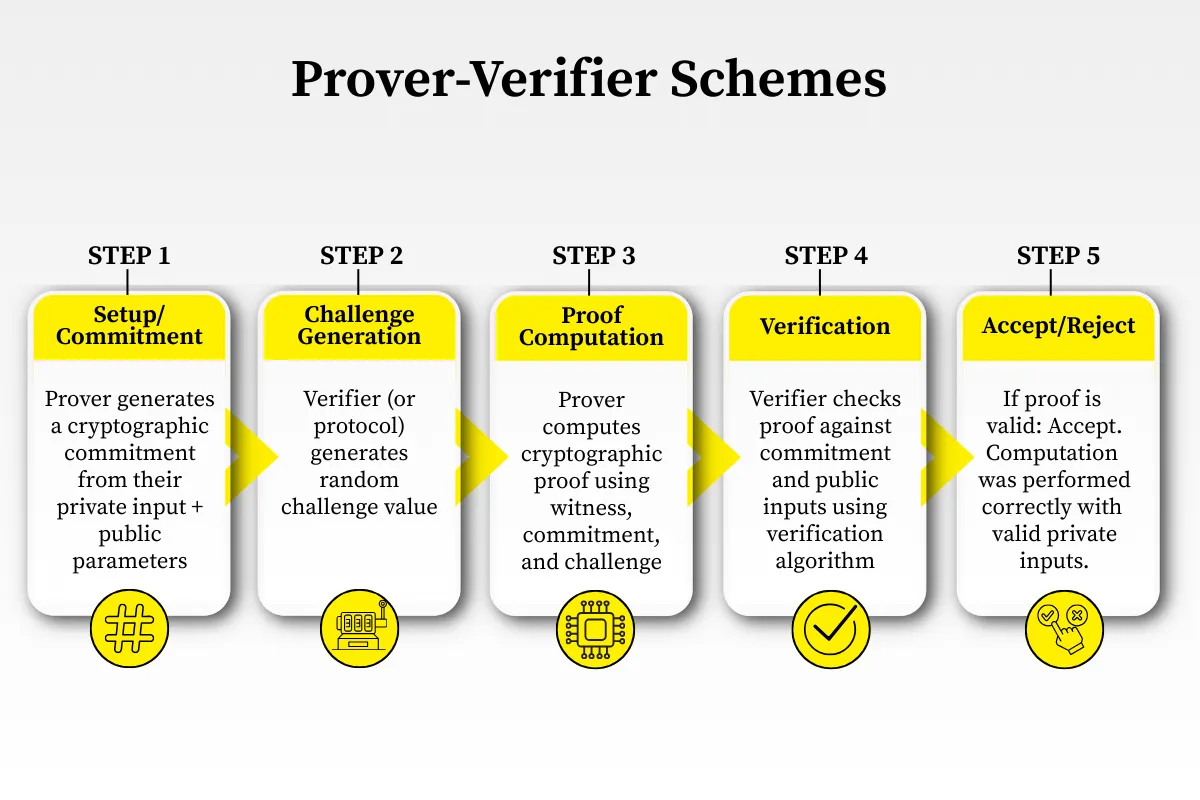
The process relies on zero-knowledge proofs (ZKP), a cryptographic protocol where one party (the prover) can convince another (the verifier) that a statement is true without revealing any information beyond the validity of the statement itself. In the context of AI training, this means a worker can prove they labeled an image or ran a simulation without revealing the dataset or their personal details.
This approach solves the privacy paradox in decentralized data markets. Traditional data collection requires sharing raw information, which creates security risks. ZK verified tasks decouple the proof of work from the data itself, enabling a privacy-preserving infrastructure for machine learning models. You contribute to AI development without compromising your digital footprint.
Set up your wallet and connect
Completing ZK verified tasks requires a compatible crypto wallet. This wallet acts as your identity on the zkVerify network, allowing you to sign transactions and receive rewards. You will use it to interact with the zkVerify dApp interface on both the testnet and mainnet.
Install a compatible wallet
Start by downloading a Web3-compatible wallet such as MetaMask. Ensure the extension is active in your browser. These wallets generate the private keys necessary to sign the cryptographic proofs required for ZK verified tasks.
Open your browser extension and create a new wallet. Secure your seed phrase offline. This phrase is the only way to recover your account if you lose access to the device. Do not share it with anyone.
Navigate to the zkVerify documentation to find the correct network parameters for the testnet or mainnet. Add these details to your wallet manually. Using the wrong network will prevent you from signing valid proofs.
ZK verified tasks on the testnet require small amounts of native tokens for gas fees. Use a community faucet to receive these test tokens. This step is essential before you attempt to submit your first proof.
Visit the official zkVerify interface. Click the connect button and select your wallet. Confirm the connection request in your wallet extension. Once connected, you can begin browsing available ZK verified tasks.
After connecting, your wallet will display your balance and activity history. You are now ready to generate and submit zero-knowledge proofs. The interface will guide you through the specific requirements for each task.
Find and claim an incentivized task
ZK Verified Tasks for Privacy-Preserving AI Training works best as a clear sequence: define the constraint, compare the realistic options, test the tradeoff, and choose the path with the fewest hidden costs. That order keeps the advice usable instead of decorative. After each step, pause long enough to check whether the recommendation still fits the reader's actual situation. If it depends on perfect timing, unusual access, or a best-case budget, include a simpler fallback.
The simplest way to use this section is to write down the real constraint first, compare each option against it, and choose the path that still works outside ideal conditions.
Generate and submit your ZK proof
Completing a ZK verified task requires converting your raw work into a mathematical certificate that proves correctness without revealing the data itself. This process transforms private computation into a public record of labor, allowing AI models to ingest verified insights while keeping your input data secure. The workflow moves from local environment setup to on-chain submission, ensuring every step is cryptographically sound.
Begin by setting up the local proving environment required by the zkVerify protocol. This involves installing the necessary cryptographic libraries and configuring your local node to communicate with the network. Ensure your system meets the computational requirements for the specific proof system you plan to use, such as Groth16 or RISC-Zero, as these determine the speed and cost of the final proof generation.
With the environment ready, feed your raw task data into the circuit to generate witness data. The witness contains all the private inputs and intermediate computation states needed to prove the task was completed correctly. This step is purely local; your data never leaves your machine, ensuring that sensitive information remains private while the mathematical structure of your work is prepared for verification.
Use the witness data to generate the zero-knowledge proof. The prover algorithm runs through the circuit constraints, producing a compact cryptographic signature that attests to the validity of the computation. This proof is much smaller than the original data, making it efficient to transmit and verify. The complexity of this step depends on the circuit size, but modern tools have optimized this to be feasible for standard hardware.
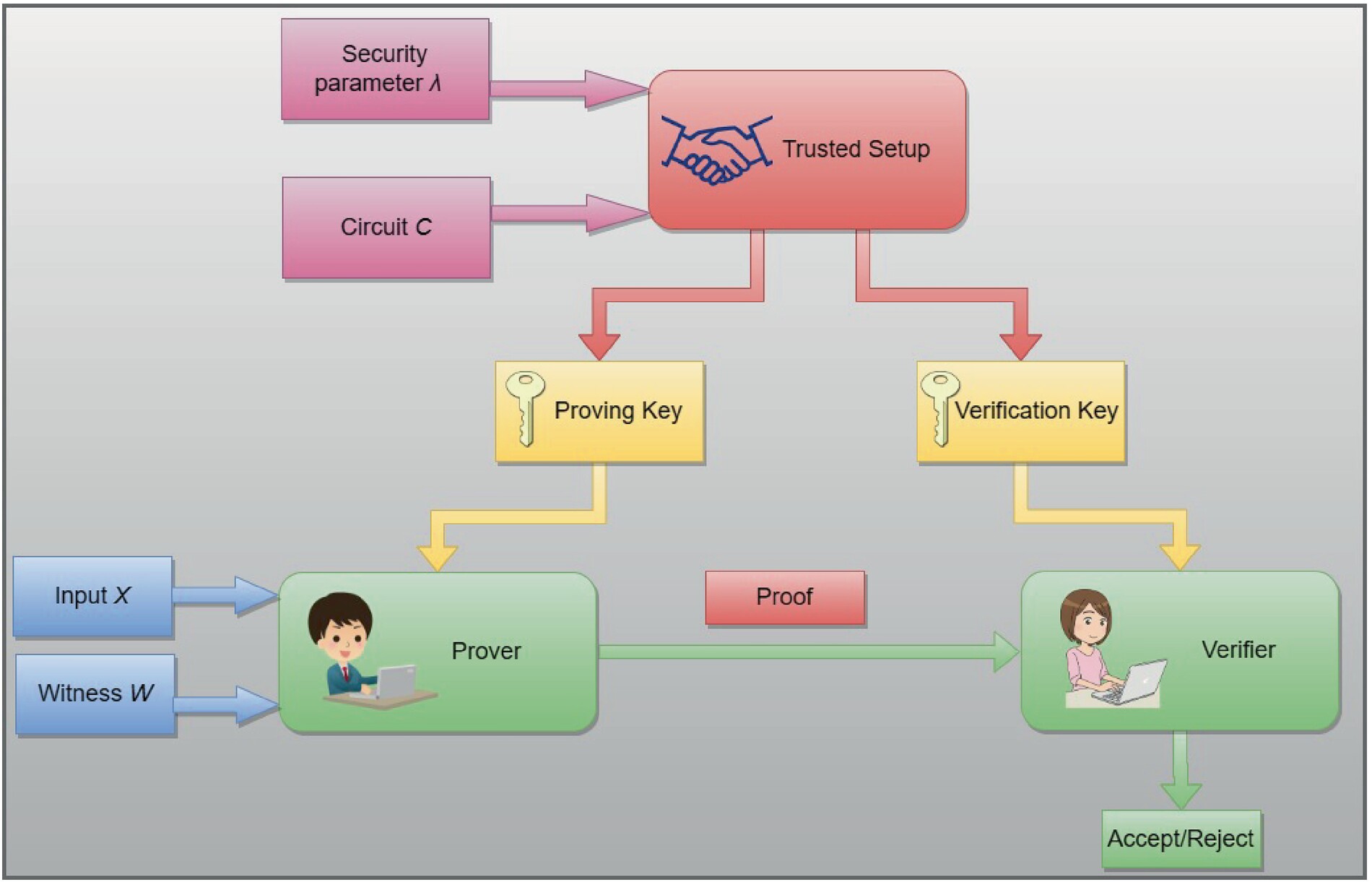
Finally, broadcast the generated proof to the zkVerify verifier contract on the blockchain. The contract checks the cryptographic signature against the public parameters to ensure the proof is valid. Once confirmed, the task is recorded on-chain, and you receive your reward or token incentive. This final step completes the ZK verified task, making your contribution available for privacy-preserving AI training without exposing your underlying data.
Which proof systems does zkVerify support?
zkVerify currently supports Groth16 and RISC-Zero proof systems. This dual support is a deliberate design choice to ensure your ZK verified tasks remain compatible with the widest range of AI training pipelines.
Groth16 is the industry standard for fast verification, making it ideal for high-volume, small-computation tasks. RISC-Zero offers generic machine support, allowing developers to run arbitrary code—such as Python scripts common in AI workflows—without complex circuit compilation.
By supporting both, zkVerify removes the friction of choosing a single cryptographic standard. You can select the proof system that best matches your task's complexity, ensuring seamless verification without compromising on privacy or performance.
FAQs about ZK verified tasks
Which proof systems does zkVerify currently support?
The protocol supports multiple proof systems, including Groth16 and RISC-Zero, providing a standardized way to handle verification at scale. This flexibility allows developers to choose the most efficient system for their specific ZK verified tasks without being locked into a single cryptographic standard.
How are rewards distributed for completed tasks?
Rewards are tied to the successful generation and verification of zero-knowledge proofs. Once a task is completed and the proof is validated on-chain, the system distributes incentives automatically. This ensures that contributors are compensated fairly for the computational work involved in privacy-preserving AI training.
Do I need specialized hardware to participate?
While ZK proofs are computationally intensive, zkVerify is designed to optimize verification at scale, reducing the barrier to entry. Most participants can complete tasks using standard cloud computing resources or local machines, depending on the complexity of the specific ZK verified task assigned to them.
Checklist for your first ZK verified task
Before claiming a bounty, run through this pre-flight sequence. Completing these steps ensures your wallet is ready, your environment is configured, and you can generate the required zero-knowledge proof without errors.
Pre-flight Checklist
-
Fund your wallet: Ensure your connected wallet holds enough native tokens to cover the initial gas fees for proof submission.
-
Install the SDK: Download and configure the official zkVerify client or SDK compatible with your operating system.
-
Claim a task: Navigate to the dashboard, select an available ZK verified task, and confirm your assignment.
-
Generate the proof: Run the computation locally and use the SDK to generate the cryptographic proof of completion.
-
Submit and verify: Broadcast the proof to the network and wait for the consensus layer to validate it.
No comments yet. Be the first to share your thoughts!