
Get zero-knowledge proof tasks right
Before you build or audit a ZK system, you need to clear three practical hurdles. Skipping these checks usually leads to wasted engineering cycles or, worse, a system that leaks more data than it promises to hide.
1. Define what "knowledge" actually is
You cannot prove what you haven't defined. Start by listing the exact private inputs (the "witness") and the public outputs (the "statement"). For remote work, this might mean proving an employee completed a task without revealing the source code or personal identity. If you try to prove "everything at once," your circuit will become too complex to verify efficiently.
2. Choose the right ZK protocol
Not all zero-knowledge proofs are created equal. zk-SNARKs are compact and allow for fast verification but require a trusted setup—a ceremony that, if compromised, breaks the entire system. zk-STARKs are transparent and scalable but produce larger proofs. For most remote trust applications, zk-STARKs are becoming the preferred choice due to their post-quantum security and lack of trusted setup requirements.
3. Audit the circuit logic
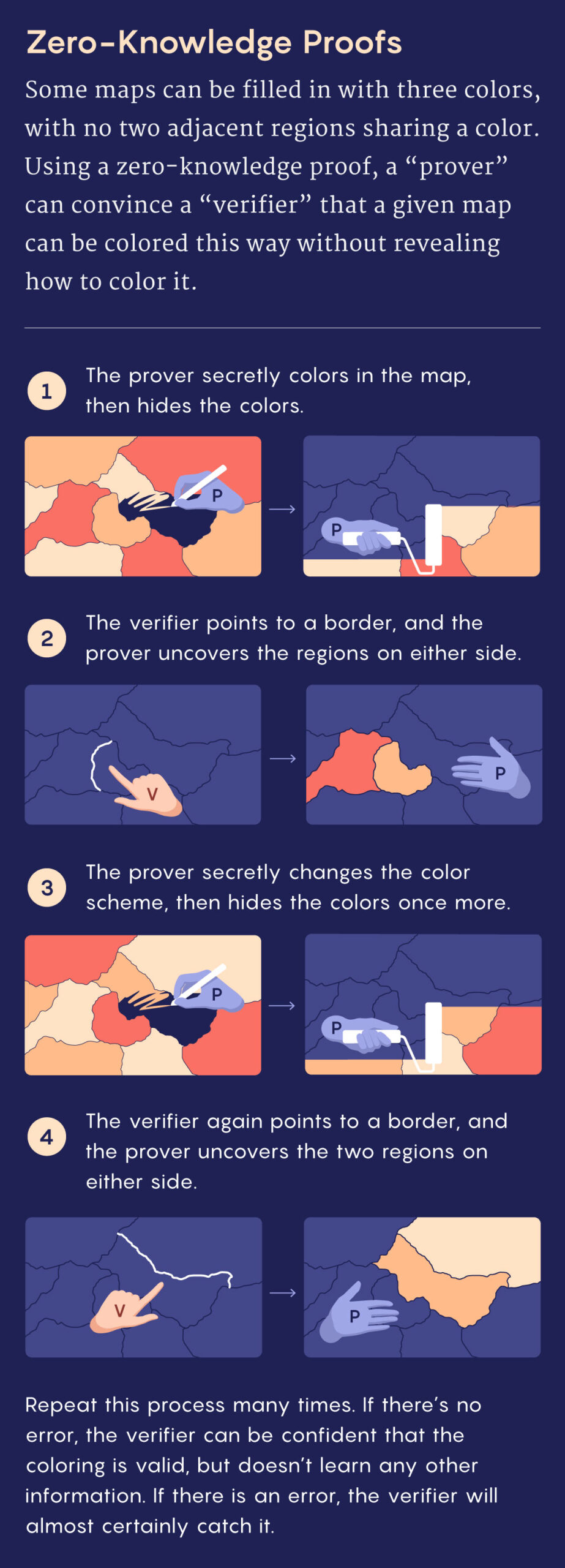
The biggest risk in ZK systems is a flawed circuit. A single logical error can allow a prover to generate a valid proof for a false statement. Use formal verification tools to mathematically prove your circuit behaves as intended. Don't rely on manual code review alone; treat the circuit as critical infrastructure, not an app feature.
-
Define private witness and public statement clearly
-
Select zk-STARKs for transparency or zk-SNARKs for compactness
-
Run formal verification on the circuit logic
Work through the steps
Setting up zero-knowledge task verification requires a structured approach to ensure privacy and integrity. The goal is to prove that a remote worker completed a task without exposing sensitive data or internal processes. Follow this sequence to implement a basic ZK proof workflow for remote team verification.

Start by separating what must remain secret from what can be public. Private inputs include the actual work product, employee identity, or proprietary code. Public inputs are the verifiable outcomes, such as a completion timestamp, a hash of the deliverable, or a simple yes/no status. Clearly mapping these inputs prevents accidental data leakage during the proof generation phase.
Translate your verification rules into a circuit—a set of mathematical constraints that the proof must satisfy. If the rule is "the employee worked more than 40 hours," the circuit checks the time logs against this threshold. Use established libraries like Circom or Halo2 to build this logic. The circuit acts as the referee, ensuring that only valid completions can generate a proof.
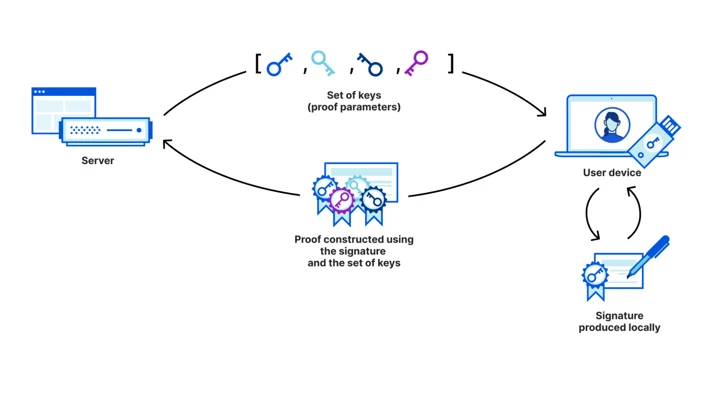
The remote worker’s device generates the zero-knowledge proof using their private inputs and the public circuit. This happens locally, meaning the actual sensitive data never leaves the employee’s machine. The proof is a compact cryptographic blob that mathematically certifies the inputs satisfied the circuit constraints. This step is critical for maintaining privacy in remote work environments.

Send the proof to the central verification system. The system checks the proof against the public parameters of the circuit. If the proof is valid, the system accepts the task completion without ever seeing the underlying data. This verification is fast and deterministic, allowing for scalable trust in distributed teams.
After setting up the verification pipeline, use this checklist to ensure your implementation is secure and efficient.
Fix common mistakes
Zero-knowledge proofs are powerful, but they are easy to misapply. In remote work, a ZKP system that looks secure on paper often fails in practice because of implementation gaps. The most frequent errors involve confusing proof generation with proof verification, ignoring computational costs, and treating privacy as an all-or-nothing feature.
Mistake 1: Generating Proofs on the Client Without Limits
Many developers try to run the entire ZK circuit on the employee’s device. This creates a massive bottleneck. Consumer laptops and phones lack the processing power to generate complex proofs quickly. The result is a frozen browser and a frustrated worker who cannot complete their task.
Instead, offload proof generation to a trusted execution environment or a dedicated backend server. The client should only handle the initial data collection and the final verification step. This keeps the user experience smooth while maintaining the security guarantees.
Mistake 2: Ignoring the Verification Cost
Verification is the cheapest part of ZKP, but only if the circuit is simple. A common error is designing a circuit that proves too much. If you ask the system to verify an employee’s entire workday history in one proof, the verification time explodes. This slows down access controls and creates latency in real-time dashboards.
Keep your circuits minimal. Prove only what is necessary for the specific trust decision. For example, verify that hours worked meet a minimum threshold, not that every single minute was spent on a specific project. Smaller circuits verify faster and cost less to audit.
Mistake 3: Assuming Privacy Means Anonymity
Zero-knowledge proofs do not make users anonymous; they make data private. A common mistake is assuming that ZKP hides the employee’s identity from the employer. In reality, the system still knows who is generating the proof, it just doesn’t know what specific data is being revealed.
If your goal is to prevent employers from seeing sensitive personal data (like health info or private messages), ZKP is the right tool. If your goal is to hide the employee’s identity entirely, you are looking for anonymous credentials, which is a different cryptographic construct. Be clear about which privacy layer you are building.
Mistake 4: Overlooking Scalability in High-Volume Scenarios
As your remote team grows, the number of proof verifications grows linearly. A system that works for 50 employees may collapse under 5,000 concurrent verification requests. This is not a bug; it is a feature of how ZKPs work. Each verification requires cryptographic computation.
Plan for batch verification. Instead of verifying each employee’s proof individually, group them into batches. This reduces the per-user computational cost. Also, consider using zk-SNARKs for their small proof sizes, but be aware of their setup costs, or zk-STARKs for their transparency, if your infrastructure can handle the larger proof sizes.
Zero-knowledge proof tasks: what to check next
You have questions about how zero-knowledge proofs work in practice, and we have answers. This section tackles the most common objections and misconceptions before you commit to a ZK-based remote work trust system.
No comments yet. Be the first to share your thoughts!